Monday, May 30, 2016

ADF: af:table filter modifications using a custom Query Listener

In one of our last projects we had the requirement to allow the user to filter tables using the table filter feature. By default you can filter String fields starting with the word that the user provides, but our customer needed to find the rows that contained the criteria.

This is an easy task that can be accomplished by creating a custom Query Listener method.


As by default the filter works with "Starts with" condition you will see that filtering by "tra" will give no result although departments like Administration exists.
In this example we will use Departments table in HR schema.


When we drag and drop to create a table and we set it to be filterable, we can see that a query listener has been created by default.


As we need to modify the filter values we need to create ouor own query listener.

The idea of this method is to get every value, and if it is String we have to change the original value and concatenate '%' before and after the value.

After that we need to call the default query listener that we can get from queryListener property in the table component.

If we end here, the  user would see the new filter with % symbol, so we are going to remove it and leave it as the user type it.


This is the helper method we use to call the default  query listener.


The last step is to set our new method as the table's query listener.


If we run the application we can see that if we filter by "tra", we can now see some records.


Tuesday, May 17, 2016

ADF: DVT Charts based on a dynamic vo

In one of our latest projects we had the requirement to create a reporting feature that based on some filters we had to built a custom query and display those results in a chart.
In this post I will show you the approach we followed.


The first step is to create a dummy view object. We are going to use SELECT * FROM DUAL as its  query.


After this we need to add this view object to our Application Module data model and also create AM implementation class.


The main thing we are going to make is to create a List in our bean, based on a POJO that we will populate with our viewobject data.
We are going to add 3 attributes to our java class with their getter and setter methods.


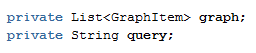
After that, in our page's bean we need to create a couple of properties. The first one is the List that will hold the values, and that will be the value property of the graph, and the second one is a String that will be the value property of the input where we will introduce the query.


The next method of the bean is the one to create the graph.
The first three lines let us create the viewobject a runtime passing the query and the view object instance.

In the rest lines of our method we are just iterating the view iterator and populating the graph List object.


The last step is to create the page that will looks like this


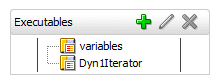
In the page definition file associated to the page we have to create the iterator binding that we are using in the bean.


While testing if we use this query, we will see a graph with the data.


And if we change it, the graph will change with the new query's data.


Sunday, May 15, 2016

Oracle MCS 16.2.3 (v2.0) realeased. MAX and Location Services are now available

Oracle Mobile Cloud Service 16.2.3 (v2.0) has been released. This is the second major release in less than 1 year (Oracle MCS was released in July 2015). Although not every MCS instance has this new version, we can already see what's new in it.


  • Location Based Services
We are now able to present information based on the location or preferences of the user. Thanks to the Location API we can get information about the location devices, assets and places.


Location Device is any device that provices location services, for example a beacon.
Currently Oracle MCS provides support for this protocols:
    • Altbeacon (Open Source)
    • Google's Eddystone
    • Apple's iBeacon
The second one is a Place  that is a physical location that you can associate with a device.
And the last one is an Asset. This is a mobile object that can be also associated with a location device.

Oracle MCS provides a REST API using the following endpoint "/mobile/platform/location/devices"


  • Oracle Mobile Application Accelerator (Oracle MAX)
Although I already had the chance to see what Oracle MAX offered back in January in a Workshop in Madrid, I was exited to see new features that MAX provides since then.

Oracle MAX is a Rapid Mobile Application Development (RMAD) tool that help us to build applications easier and faster. This tool allows business users and non developers to build applications.

Wednesday, May 4, 2016

Oracle MAF: Oracle MCS as authentication provider

An usual requirement when working with Oracle Mobile Application Framework and Oracle Mobile Cloud Service is implement the login against Oracle MCS.
In this post I am going to show you how to configure Oracle MCS as an authentication provider in Oracle MAF.


  • Creating a Realm
A realm is a security context for a ser of users. We can have only one realm for each Mobile Backend, but we can have multiple Mobile Backend using the same realm.
Using one or more realm in MCS will depend on what users we will like to give access to our application.

Under Applications, we can find Mobile User Management. By default there is one realm named 'default', but we can create a new one by clicking on 'New Realm' button.


In the realm we can find some user information by default altough we can add more properties.


  • Create and configure a Mobile Backend
A Mobile Backend (MBE) is the gateway to Mobile Cloud Service. If we want to access any available resource from MCS, for example an API, we have to do it though an MBE.

We can find Mobile Backends option under Applications menu option.

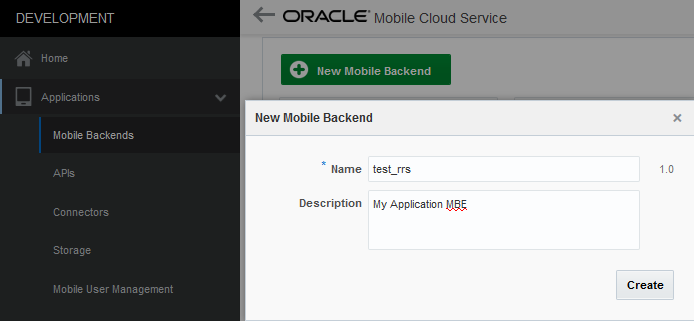
Click on 'New Mobile Backend' to create a new one.


Once you have created the MBE head to Users option and click on 'Change user realm', by default the MBE has a realm but in this case we need to set the new realm we have just created. This is not the case, but we can also set a default realm for every new created MBE.

Friday, April 29, 2016

Oracle MCS version 16.1.3 (v1.2) released

A couple of weeks after Oracle MCS 1.1 (16.1.1) was released, I saw that Oracle MCS What's new page was updated but until now I did not realised the instance has been updated to this new version.

This new version is 16.1.3 (v1.2) and is now live in Oracle MCS instances. It's good to see that Oracle keeps updated MCS becasue in less than 3 months we have a new version.


In this new released version there are some changed for every role involved in a MCS development project. These are some of the new features:


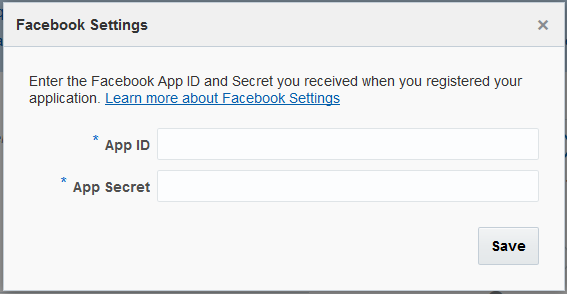
  • Enabled Facebook login and Enterprise Singles Sign-On
Now we can enable our mobile users to log into the mobile apps using their Facebook account or their corporate SSO credentials.


  • Debuging notifcations
Oracle MCS provides a device registry where you can check every registered device. It will not show if the token is invalid or if the devide has not been reregisted in 60 days.

  • Notifications REST API
Now we can send driver-especific payloads instead of writting all the code.

  • JavaScript SDK
JavaScript SDK has been re-tooled to support browser-based mobile applications.

  • Database SDK
It is now much easier to interact with MCS Database from Custom APIs implementation.

  • Purge and restore artifacts
In previous versions we were able to delete any artifact but it wasn't deleted permanently from our MCS instance. Now we can purge MCS artifacts trash or restore or restore items if we deleted if accidentally


You can get more information in this link: http://bit.ly/1SUbZKu

Thursday, April 21, 2016

Oracle MAF 2.3: deploying and installing an application to the Universal Windows Platform


Almost one month ago, Oracle released Oracle Mobile Application Framework 2.3 that allow us to build Windows 10 applications. After building or migrating our application it is time to distribute it.

Fist you have to prepare you development environment. You can check how to do it here:  Oracle MAF: configuring Windows 10 development environment

In this post I will show how to deploy and install an UWP executable


We are going to use Workbetter application that can be found in the next path (change 'C:\Oracle\Middleware1221' with your JDeveloper installation path):

'C:\Oracle\Middleware1221\Oracle_Home\jdeveloper\jdev\extensions\oracle.maf\Samples'


One we have opened the application we have to deploy it as we usually do todeploy it to iOS or Android, but selecting Windows profile.


Once the deployment has finished, under deploy folder we will a folder structure like this:

'...\deploy\Windows1\debug\MafTemplate\AppPackages\MafTemplate_1.0.0.0_Debug_Test'

The last folder will depend on the version number and the build mode. We will see many files and folders that includes the dependencies and the certificate we used to sign the application.

This is the folder you have to share in order to install the application.


In order to install the application we have to 'Run with PowerShell' the .ps1 file.


We will see a progress bar while installing.


Once it is installed we can search for the application and run it.


Wednesday, April 6, 2016

OTN Tech Article: PCS, MCS and MAF Integration


I have just published my first OTN Tech Article where I present a use case that demonstrates how Oracle Process Cloud Service (Oracle PCS), Oracle Mobile Cloud Service (Oracle MCS) and Oracle Mobile Application Framework (Oracle MAF) can be use together to expose  an Oracle PCS process instance as a web service and consume it from an external system, web application or mobile application.


"Oracle Process Cloud Service is a Platform as a Service (PaaS) provided by Oracle Cloud, allows you to rapidly design, automate, and manage business processes in the cloud."


"Oracle Mobile Cloud Service is Oracle's Mobile Backend as a Service (MBaaS) and enables companies to create and deploy scalable, robust, and secure mobile applications quickly and easily."


"Oracle Mobile Application Framework is a hybrid mobile framework that provides a visual and declarative development experience for the rapid development of multi-platform applications"


You can check the full article here: https://community.oracle.com/docs/DOC-996644