Friday, April 29, 2016

Oracle MCS version 16.1.3 (v1.2) released

A couple of weeks after Oracle MCS 1.1 (16.1.1) was released, I saw that Oracle MCS What's new page was updated but until now I did not realised the instance has been updated to this new version.

This new version is 16.1.3 (v1.2) and is now live in Oracle MCS instances. It's good to see that Oracle keeps updated MCS becasue in less than 3 months we have a new version.


In this new released version there are some changed for every role involved in a MCS development project. These are some of the new features:


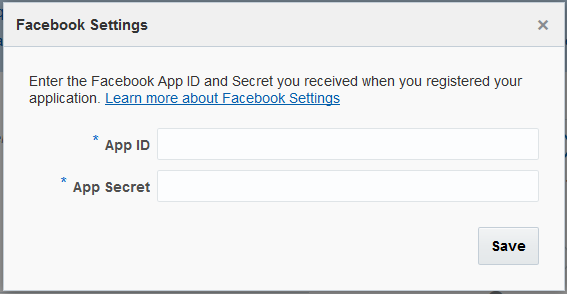
  • Enabled Facebook login and Enterprise Singles Sign-On
Now we can enable our mobile users to log into the mobile apps using their Facebook account or their corporate SSO credentials.



  • Debuging notifcations
Oracle MCS provides a device registry where you can check every registered device. It will not show if the token is invalid or if the devide has not been reregisted in 60 days.

  • Notifications REST API
Now we can send driver-especific payloads instead of writting all the code.

  • JavaScript SDK
JavaScript SDK has been re-tooled to support browser-based mobile applications.

  • Database SDK
It is now much easier to interact with MCS Database from Custom APIs implementation.

  • Purge and restore artifacts
In previous versions we were able to delete any artifact but it wasn't deleted permanently from our MCS instance. Now we can purge MCS artifacts trash or restore or restore items if we deleted if accidentally


You can get more information in this link: http://bit.ly/1SUbZKu

Thursday, April 21, 2016

Oracle MAF 2.3: deploying and installing an application to the Universal Windows Platform


Almost one month ago, Oracle released Oracle Mobile Application Framework 2.3 that allow us to build Windows 10 applications. After building or migrating our application it is time to distribute it.

Fist you have to prepare you development environment. You can check how to do it here:  Oracle MAF: configuring Windows 10 development environment

In this post I will show how to deploy and install an UWP executable


We are going to use Workbetter application that can be found in the next path (change 'C:\Oracle\Middleware1221' with your JDeveloper installation path):

'C:\Oracle\Middleware1221\Oracle_Home\jdeveloper\jdev\extensions\oracle.maf\Samples'


One we have opened the application we have to deploy it as we usually do todeploy it to iOS or Android, but selecting Windows profile.


Once the deployment has finished, under deploy folder we will a folder structure like this:

'...\deploy\Windows1\debug\MafTemplate\AppPackages\MafTemplate_1.0.0.0_Debug_Test'

The last folder will depend on the version number and the build mode. We will see many files and folders that includes the dependencies and the certificate we used to sign the application.

This is the folder you have to share in order to install the application.


In order to install the application we have to 'Run with PowerShell' the .ps1 file.


We will see a progress bar while installing.


Once it is installed we can search for the application and run it.


Wednesday, April 6, 2016

OTN Tech Article: PCS, MCS and MAF Integration


I have just published my first OTN Tech Article where I present a use case that demonstrates how Oracle Process Cloud Service (Oracle PCS), Oracle Mobile Cloud Service (Oracle MCS) and Oracle Mobile Application Framework (Oracle MAF) can be use together to expose  an Oracle PCS process instance as a web service and consume it from an external system, web application or mobile application.


"Oracle Process Cloud Service is a Platform as a Service (PaaS) provided by Oracle Cloud, allows you to rapidly design, automate, and manage business processes in the cloud."


"Oracle Mobile Cloud Service is Oracle's Mobile Backend as a Service (MBaaS) and enables companies to create and deploy scalable, robust, and secure mobile applications quickly and easily."


"Oracle Mobile Application Framework is a hybrid mobile framework that provides a visual and declarative development experience for the rapid development of multi-platform applications"


You can check the full article here: https://community.oracle.com/docs/DOC-996644


Sunday, April 3, 2016

Oracle MAF: configuring Windows 10 development environment

One of the main features that includes Oracle MAF 2.3 released early this week is the ability to deploy applications in any Windows 10 device.


Downloading and Installing JDeveloper 12.2.1

To develop an application with Oracle MAF 2.3 we need JDeveloper 12.2.1 that can be downloaded in this link:

http://www.oracle.com/technetwork/developer-tools/jdev/downloads/index.html

You have to download both files.


Once we have installed JDeveloper, we have to install Oracle Mobile Application Framework extension.
This is a known step for JDeveloper users, under 'Help' menu click on 'Check for updates' and select MAF extension.


Downloading and Installing Visual Studio 2015 Community Edition

First of all we have to download Visual Studio in this link:

https://www.visualstudio.com/products/visual-studio-community-vs


We can use Community, Professional or Enterprise versions

 And click on download button.


Once we have executed the installer, in the wizard we have to select this items and finish the installation.


Creating and Installing the PFX file

Now we need to create a Personal Information Exchange (.pfx file). 


The tools we are going to use are in this folder:

cd C:\Program Files (x86)\Windows Kits\10\bin\x64

First we need to create a .cer and .pvk files.

makecert.exe -sv E:\maf\maf.pvk -n "CN=Ruben Rodriguez,OU=MAF,O=rsantrod,C=ES" -r -h 0 -eku "1.3.6.1.5.5.7.3.3,1.3.6.1.4.1.311.10.3.13" E:\maf\maf.cer

A brief explanation of the arguments
  • -sv path of the private key
  • -n name of the certificate
  • -r means that is self signed
  • -h 0 means that cannot be used as a CA (Certification Authority)
  • -eku 
    • 1.3.6.1.5.5.7.3.3 the certificate can be used to sign code
    • 1.3.6.1.4.1.311.10.3.13 lifetime signing
  • The last one is the path of the .cer file

Wednesday, March 30, 2016

Oracle MAF 2.3 has been released

The most  awaited version of Oracle Mobile Application Framework (Oracle MAF 2.3.0) has been released. This is a big announcement as we can now build Windows 10 applications that can be run on any Windows 10 devices, even on computers. 


These are some of the new features of this release:


JDeveloper 12.2.1


Oracle MAF 2.3.0 is now available in JDeveloper 12.2.1, released in November just before Oracle Open World.


Windows 10 support


Oracle MAF now allows to deploy the application to Windows 10 devices, event desktops or laptops but there are some limitations as you can only deploy the applications to devices based on x86 chipset.


Mobile Cloud Service Analytics integration

This release also provides built-in support for generating analytics events in Oracle Mobile Cloud Service. This will allow us to create custom analytics events and also for lifecycle events like startup, user login, etc... without any line of code.


Data Visualization Tools enhancements

Some of this enhancements are that we can individually style the axis labels or tooltips.


We can also set vertial orientation  for Rating Gauge.


In conclusion I think that this is a step forward and that Oracle MAF is now one of the best choices to build cross-platform single-code mobile applications that makes the development simpler thanks to the declarative programming.


You can check step by step how to configure the development environment in this link: Oracle MAF: configuring Windows 10 development environment


You can get more information in these links: link 1 and link 2.


Thursday, March 17, 2016

Oracle Fusion Middleware & PaaS Community Forum 2016

This week I had the chance to assist to Oracle Fusion Middleware & PaaS Community Forum 2016 that is taking place in Las Arenas Hotel in Valencia, Spain. This event is organized by Jürgen Kress


The first day was intense and although we started at 10:30 AM we had 6 sessions where some Oracle's top speakers talked us about Middleware, PaaS, BPM in the Cloud (Process Cloud Service), and my favourite of the day 'Next-Generation application Development - The Mobile and Cloud effect' where we were able to see a Oracle Mobile Application Accelerator demo (It will be included in future releases of Oracle Mobile Cloud Service) that will help business users to create mobile applications easily.


The last part of the day was the Community Awards where avanttic was awarded with Oracle Fusion Middleware Community Forum - Mobile award for Outstanding Mobile Contribution 2016. I had the honor to receive the award and also to present the customer success of our last Oracle MAF and Oracle MCS project.


Congratulations to all the winners of this year!


Thursday, March 10, 2016

Using Postman to test REST APIs

When testing SOAP web services almost everyone uses SOAP UI. In terms of REST APIs testing I like to use Postman instead. In this post I am going to show what you can achieve or do with Postman that is available as a Chrome App or Mac App.

  • Storing REST calls in collections
By clicking Save button in the right hand side you can store the requests you are working on.


You can store them in collections. You can also create folders inside those collections.


Collections can be shared or downloaded as a json file.


  • Manage environments
Environments holds variables that can be used in a request.


You can have as many environments as you want. There is an option to also create global variables that applies to your requests although you don't have any environment selected.


This is an example of my MCS environment.


Having a variable called 'MobileBackendId', you can use it in the request like this: {{MobileBackendId}}


  • Executing pre-request scripts
You can also execute a script before a request is done. In this example, instead of changing the date before each request, you can create a script that fills currentDate variable with the system date and also formats the date.


  • Create tests
When a request is executed, you have a way to know if it is working fine without having to look the response.
For example I have created 2 tests:

  • If the body contains 'message' property.
  • If the response code is 202.

After executing the request you will see if the tests has passed or not.