Wednesday, February 24, 2016

First Mobile Cloud Service project in Spain is now in prodution!

This is an important week in the mobile scene where Mobile World Congress is taking place in Barcelona, I think there is no better time to announce that the first Oracle Mobile Cloud Service in Spain is now in production. If you don't know what Mobile Cloud Service is, you can check all my previous posts here. Posts about Mobile Cloud Service.


In avanttic we developed this project combining Oracle Mobile Application Framework with Oracle Mobile Cloud Service, which has allowed us to implement a mobility solution for the sales force of Industrial Farmacéutica Cantabra (IFC) in no time. The application will allow IFC to gain efficiency in their sales process and increase the turnover.


About the technology:


"Oracle Mobile Application Framework is a hybrid mobile framework that enables developers to rapidly develop multi-platform single-source applications Oracle MAF provides a visual and declarative development experience and maximizes code reuse resulting in faster development of mobile applications."


"Oracle Mobile Cloud Service is Oracle's Mobile Backend as a Service (MBaaS) and enables companies to create and deploy scalable, robust, and secure mobile applications quickly and easily, and empowers developers to leverage enterprise IT systems—without having to get IT involved"




Sunday, February 21, 2016

ADF: Different ways to display validation messages

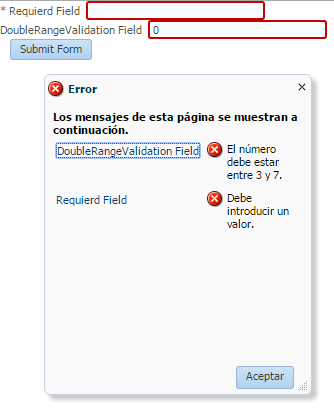
This post is about the different ways that we have to display validation messages when, for example, an input component is marked as required or when other component such as af:validateDoubleRange is used to handle the validation.


We can have a simple form like this:


By default, if there is only one validation error, the validation message will be displayed like this:


But if we have more than one validation error, the messages will be displayed in a popup.


If we want to change the way those messages are displayed we can use a couple of components.

  • af:messages

 We have a couple of properties to configure.

    • globalOnly: When set to true, validation messages will not be displayed within this af:messages component.
    • inline: Whether the messages will be displayed in a popup or inline wherever this component is placed


We can add this component, for example, in the top of the form and whenever we get a validation error al messages will be displayed in that area.


  • af:message

 The second option is to add as many af:message as components we have so we can display validation errors inline next to the component that produces the error.


It doesn't matter if we have 1 or more errors, all messages will be displayed inline, next to the component.


Monday, February 15, 2016

Oracle Mobile Cloud Service New version has been released

New Oracle Mobile Cloud Service version has been released where we can find, a redisign of the application and some improvements that we were missing the the previous version (1.0). This new version 1.1 matches 16.1.1


if you want to know more about Oracle Mobile Cloud Service you can check my previous post: Oracle Mobile Cloud Service overview

The first changes that we can see is the design of the application. In the new version the menu is on the left hand side and you can collapse it. You can also change between environments with the combo box in the header of the application.


Another change we find is in Mobile Backend authentication. In the previous version we were able to use HTTP Basic, but in the new version we can configure our Mobile Backend to use OAuth authentication.


Oracle said that more connectors will come in future releases. Until now we were able to integrate REST and SOAP web services, now we can integrate our Integration Cloud Service instance thanks to the new connector.


Analytics is other feature that has changed, nwo we can create custom reports so we can avoid to select the filters every time we want to see them.


Other new features that were introduced are:

  • We can now integrate out .NET and JavaScript applications thanks to the new SDKs.
  • We can configure some static values when deploying between environments in our Mobile Cloud Service instance by editing a properties file.
  • We can also export and import any artifact we create so the migration between instances is easier.


If you want to know more about the new version you can check: What's new in Oracle Mobile Cloud Service

Monday, February 8, 2016

ADF 12.2.1: Publish and secure ADF Business Components as REST services

In ADF 12.2.1, released just before OOW, many new features were introduced, and one of them is to expose ADF Business Components as REST Web Services. You can check other ADF 12.2.1 features in my ADF 12.2.1 release post.
In this post I am going to publish and secure ADF BC as REST services.


The first thing we have to do is to configure a release version for REST. You can do this in adf.config.xml file.


In previous versions we could expose BC as SOAP web services in Application Module Web Services tab, and now we can choose also REST.


We can select the view instances and set a resource name.


A xml file will be automatically created where for example we can set the attributes we want to expose and also if we want to expose any custom methods that we have created in the view implementation classes.


A new project will be also created in our application RESTWebService. This is the project we have to deploy. Simply click on the project and click on run.


If we test the service with any client tool, for example, Postman, we can see that the service returns Departments data.


The next thing we are going to do is to secure the services. We have to configure ADF Security.


In the configuration wizard RESTWebService project must be selected.


After finishing the wizard we have to secure the resource by adding some roles or users.


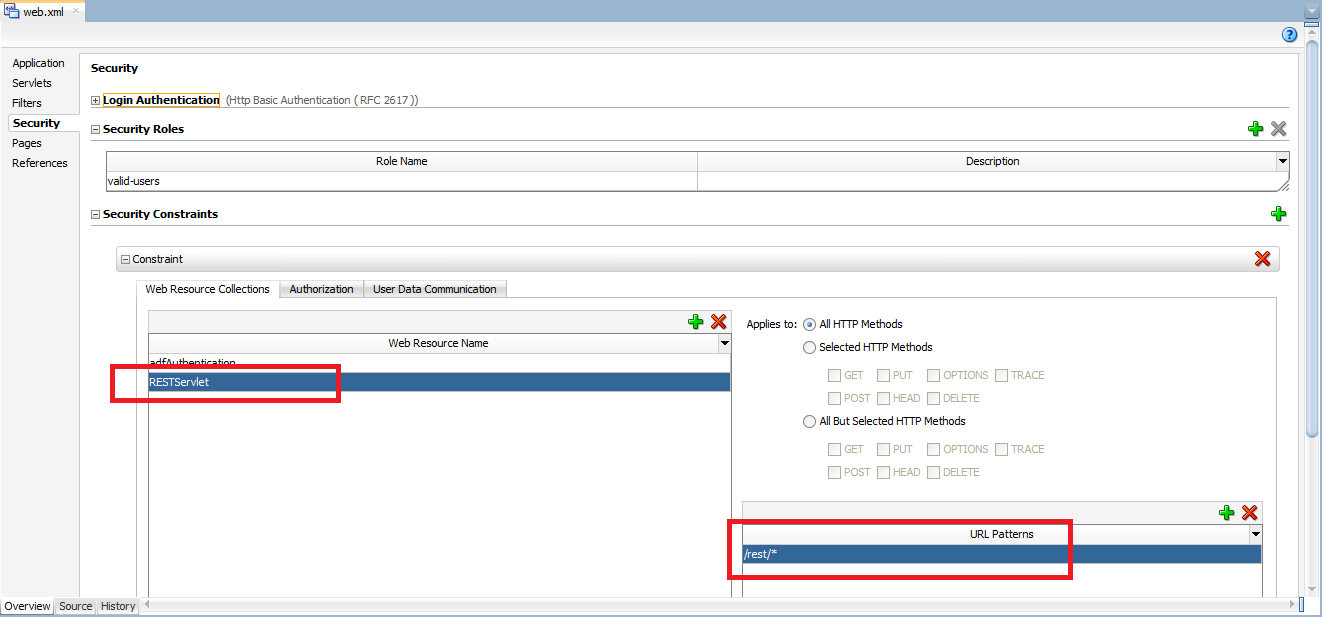
The last step is to configure the rest URL pattern in web.xml file, under security tab.


Now we are ready to test. If we don't set any authorization in the rest call we can see that a "401 - Unauthorized" is returned.


But if we configure HTTP basic authentication, Departments data is returned.


Friday, January 29, 2016

MCS: Calling SOAP connector bypassing XML/JSON translator

In the MCS project we are working we have to create some SOAP Connectors to integrate with Siebel. A great thing of MCS is that although we are going to consume a SOAP web service, the XML payload is automatically translated into JSON. You can get more info in MCS Documentation.

I would like to thank Oracle Mobile PM  team, specially Grant Ronald and Frédéric Desbiens for their great help and for sharing best practices about this issue.


As soon as we create a SOAP Connector and try to test it we can see that the body we have to provide is a JSON.


But there are some cases where the translator is not perfect. We had a problem with some services that had an XML structure like this:


The translator seems not to add the  namespaces in the header therefore Siebel cannot parse the request.

The solution is to send a XML instead of a JSON, bypassing the translator.
We can test this in SOAP Connector tester. As we need the required XML, we can get it in any web service client tool like for example SoapUI.


We also have to set "Content-Type: application/xml;charset:UTF-8" and "Accept: application/xml" as header parameters.


If we test the Connector we can see that the web service call is working.


How do we implement the Custom API to send a XML payload to the connector?
The answer is to set the XML we want to send as the body of the request and set the header parameters we previously use to test the connector.

But, is this the recommended approach? Yes it is, but instead of sending a String with the SOAP message it is more secure to send it as a JavaScript object.

In order to implement this we have to follow some steps:
  1. Download and Install Node.js. link
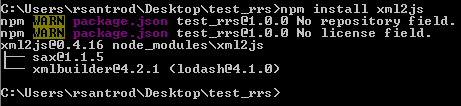
  2. Install xml2js module.
  3. In this example test_rrs is the directory where the package.json file resides.


  4. Add xml2js as a dependency in package.json


  5. Moving to our javascript file, as I already stated before the first idea was to build the SOAP message as a string. This first image is the base implementation and we are going to make some changes to it.


  6. First we need to add var xml2js = require('xml2js'); at the top of our implementation.


    This is the tricky part, we need to create a JSON like this.
    ' $ ' means that we want to add attributes to the XML element.
    ' _ ' means that we want to have something inside that element.


    The last thing we have to do is to create a xml2js.Builder object and execute buildObject method using the json object we have just create. The result of this method is the body we are going to send.


After the implementation is done we just have to put everything inside the zip file and upload it to MCS.


If you want to know more about xml2js click here.


Friday, January 22, 2016

Oracle Mobile Cloud Service 3 Days Workshop in Madrid

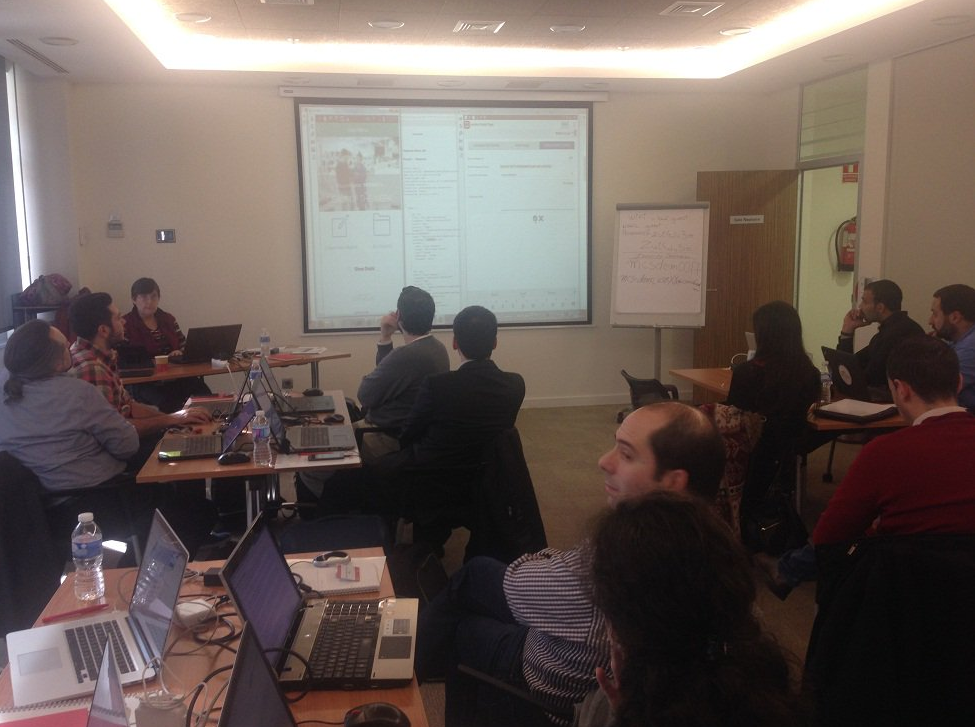
Last week I had the chance to attend a Mobile Cloud Service 3 days workshop in Madrid. This was the first MCS training in Spain where some partners and I were able to get a good insight about what MCS offers and also a complete hands-on.


If you want to know MCS functionality you can check my previous post: Oracle Mobile Cloud Service overview.


Although I already attended Oracle Summer Camps workshop in Lisbon, we are in the middle of a MCS development and  this workshop was a perfect fit for mastering my MCS skills and also any question we made was perfectly answer by Mireille Duroussaud (Senior Principal Product Manager).


We were also able to see some of the features that will bring the next versions of Mobile Cloud Service like Mobile Application Accelerator (Oracle MAX), and hear of others like for example a JavaScript editor for implementing and debugging APIs right in the browser.


I was really impressed about Oracle MAX becasue building a Mobile Application connected to Mobile Cloud Service was just a matter of 10 minutes. Although the things you can do with Oracle MAX are limitted, it is likely possible that we will be able to donwload the source code of the generated application to extend it wich is a nice feature.


I think this is a must-attend workshop it you are planning to start a Mobile Cloud Service project anytime soon. You can also check Oracle Mobile Platform Youtube channel where you can find more than 50 videos about MCS.


Wednesday, January 13, 2016

ADF: Filtering parent and child nodes in af:tree / af:treeTable

One of our customers required to filter data in a page with a tree component. Using Ashish's post I am going to show you how to filter both parent and child nodes having just a single filter value. This can also be applied to treeTable component.


The first thing we need is a tree component and data structure, in this case we are going to use Oracle's hr schema tables: Departments and Employees.

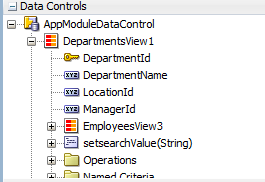
In our page we drag and drop DepartmentsView from datacontrols palette and create a tree component.


The next thing we have to do is to create a View Criteria in Departments View Object (parent).


We also have to crete a View Criteria in Employees View Object (child).


We have to expose setter method of the bind variable in parent View Object.


As we exposed the bind variable in parent, we need  to pass that value to the child by overriding createViewLinkAccessorRS method in parent View Object Implementation class (DepartmentsViewImpl.java)


The last step in the Model is to set a default View Criteria in parent View Object. To set it we have to right click on the View Object instance in our AppModule, click on 'Edit', select the View Criteria and click on 'Ok' button.


The Model is now finished, we now have to drag and drop the setter method from the data controls palette and create an 'ADF Parameter Form' so we can provide the filter value.


This will create 'setsearchValue' method binding in the pageDef. We also need to create a Execute operation of the parent View Object and call both operations from the 'Filter' button ActionListener.


This is how we should have the page.


If we run the application we can see the if we filter by 'pat' we just get values that contains that string.


If now we filter by 'les', we can see that we get values with 'les' string in both parent and child nodes.